Content calendar & social media management
Your whole content calendar, from idea to published.
Flowtent keeps every post — the idea, the caption, the media, the schedule — in one place. See how it lands on each platform, cut the video in your browser, and let it publish itself.
Free during early access · English and Polish · No credit card
Protected by Cloudflare Turnstile — verification runs only after you click the button.
Content planning falls apart in three places.
The plan is in a spreadsheet, the captions are in Notes, the media is in a folder, and the deadlines are in your head.
Every platform wants a different crop, a different length, a different caption — and you find out after you’ve posted.
Publishing on time means being at your desk at the right minute. Every time.
How it works
Four steps, and the plan runs itself.
-
1
Capture the idea
Drop it into the ideas bank before it disappears. Turn it into a post when you’re ready.
-
2
Put it on the calendar
Pick the date, the platform and the format. Drag it to a new day if plans change.
-
3
Write it and see it
Write the caption, attach the media, and look at a real preview of the platform you’re posting to.
-
4
Let it publish
Connect your accounts once. Flowtent posts at the time you set, in your project’s time zone.
Plan
See the whole month, not just the next post.
A month grid and a list view of everything you have planned, colour-coded by status. Drag a post to a new day and the schedule follows. Week numbers included, because that’s how content plans are actually written.
- Idea
- Planned
- In progress
- Waiting for approval
- Published
Preview
Know how it looks before you post it.
Flowtent renders your post the way the platform will — Instagram feed, Reels, Stories and carousels, TikTok, Facebook, LinkedIn, YouTube Shorts, X and Snapchat. Switch format and the preview — and the checks beside it — change with it.
- TikTok
- YouTube
- X
- Snapchat
Publish
Set the time. Close the laptop.
Connect Instagram, Facebook, TikTok, LinkedIn or YouTube once. Flowtent publishes at the moment you scheduled, in your project’s time zone rather than the server’s.
If a platform rejects a post, Flowtent tries again — and then tells you exactly what happened and where.
Every project has its own time zone.
Video editor
Cut the video without leaving the plan.
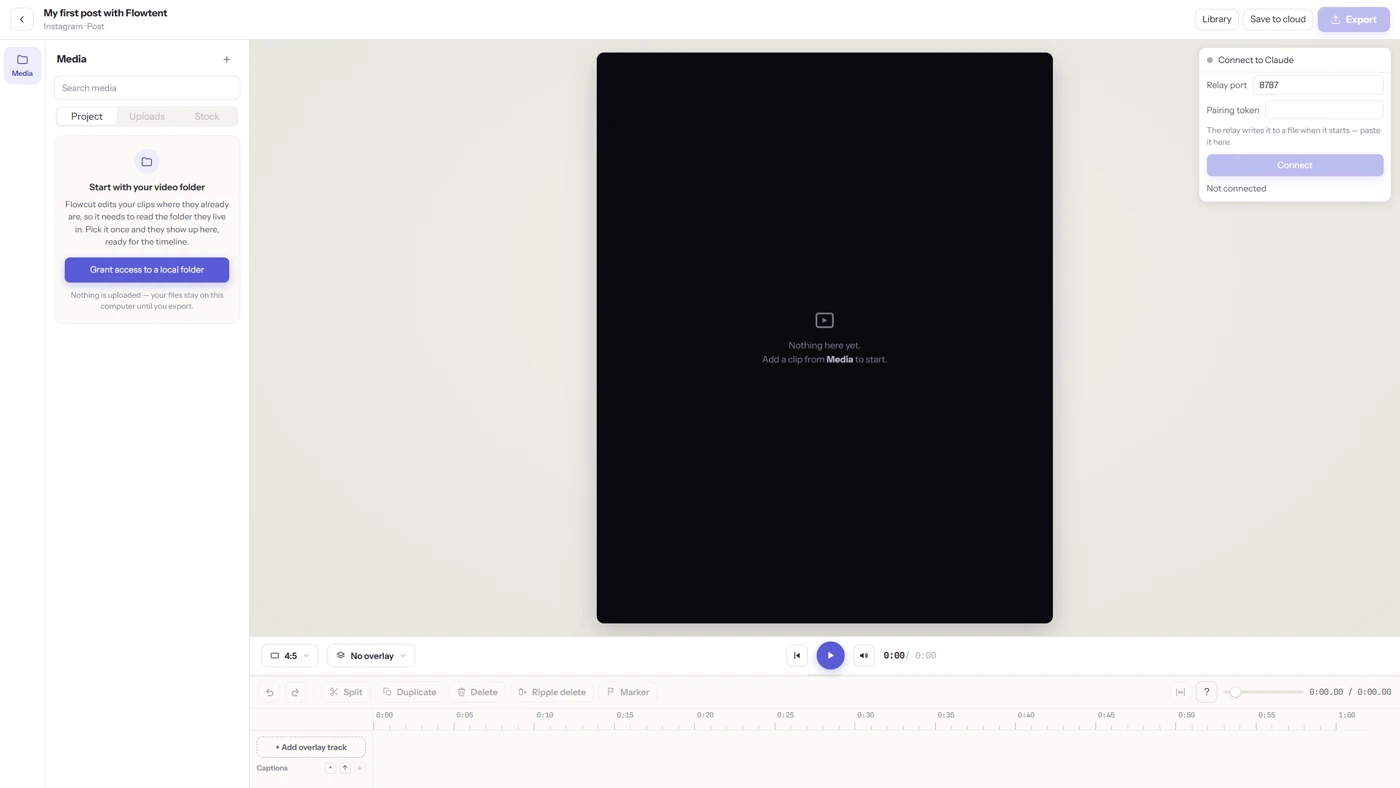
Flowtent Studio is a video editor built into Flowtent that runs in your browser. Open it from the post you’re working on. Trim the clips, add text and music, apply transitions, and export straight back onto that post — no downloading, re-uploading or switching apps.
Your files stay on your computer
Editing happens on your machine. Source video and audio are never uploaded — only the finished video is saved to your post.
Flowtent Studio runs on desktop browsers based on Chromium, such as Chrome, Opera or Edge. It is in active development alongside Flowtent.
The rest of the plan, kept in one place.
Ideas bank
IdeaEvery half-formed thought in one list, ready to become a post.
Scenarios
The longer story behind a post: the angle, the shot list, the script.
Templates
optional · reusableThe posts you make every week, saved once and reused.
A finished post on the calendar
PlannedBuilt for one person. Ready for more.
Creators and freelancers
You’re the strategist, the writer, the editor and the publisher. Flowtent is the one place all four of you work.
In-house marketing teams
Keep the plan visible to everyone, the tone consistent, and the approvals on record.
Small agencies
A separate project for each client, with its own accounts, members and time zone.
When you’re not working alone
Invite people to a project as owner, editor or member. Turn on approvals so nothing goes out unreviewed. Leave comments, mention someone with @, and get notified when it’s your turn. Every change is recorded.
- Owner · Editor · Member
- Approvals
- Comments and @mentions
- Full change history
Flowtent is fully working today — planning, previews, approvals and auto-publishing. We let new teams in in batches so everyone gets our attention. Your account and your data stay with you for good. Join the list and we’ll email you when it’s your turn. No card, nothing to cancel.
Questions people ask
What does Flowtent cost?
Nothing during early access. We’ll announce pricing at least 30 days ahead, and current users will hear first — accounts and data stay whatever the plan.
Which platforms can it publish to?
Instagram, Facebook, TikTok, LinkedIn and YouTube. X and Snapchat are supported for planning and previews.
Do I need to install anything?
No. Flowtent runs in your browser. The video editor needs a desktop browser based on Chromium, such as Chrome, Opera or Edge.
Can I use it with a team?
Yes. Invite people to a project as owner, editor or member, turn on approvals, and every change is recorded in a change history.
Is Flowtent available in Polish?
Yes. The whole app is in Polish and English.
What happens to my video files?
Editing happens on your computer, and your source files are never uploaded. Only the exported video is saved to your post.
Can I plan across different time zones?
Yes. Each project has its own time zone, and posts publish according to it.
What happens after I join the waitlist?
You’ll get one email when your invitation is ready. We don’t sell your address and we don’t send anything else.
Get your content plan out of the spreadsheet.
Join the waitlist and we’ll let you know when your spot opens.
By joining you agree to receive one email about your invitation. See our Privacy Policy. Protected by Cloudflare Turnstile — verification runs only after you click the button.